Deploying a Production-Ready Multi-Service System
How I built and deployed a decoupled architecture using Next.js, FastAPI, Docker, GitHub Actions, Render, and Vercel.
June 7, 2026 (1mo ago)
4 min read
InfoBefore we dive in: This isn't another tutorial about hosting a single monolithic app on Vercel. This is a breakdown of a live, decoupled infrastructure designed for heavy workloads like web scraping and AI-powered data processing.
🗺️ Visualizing the Deployment Flow
Here is the exact infrastructure layout showing how code moves from a developer's machine to the live environment, and how these decoupled services talk to each other under the hood:
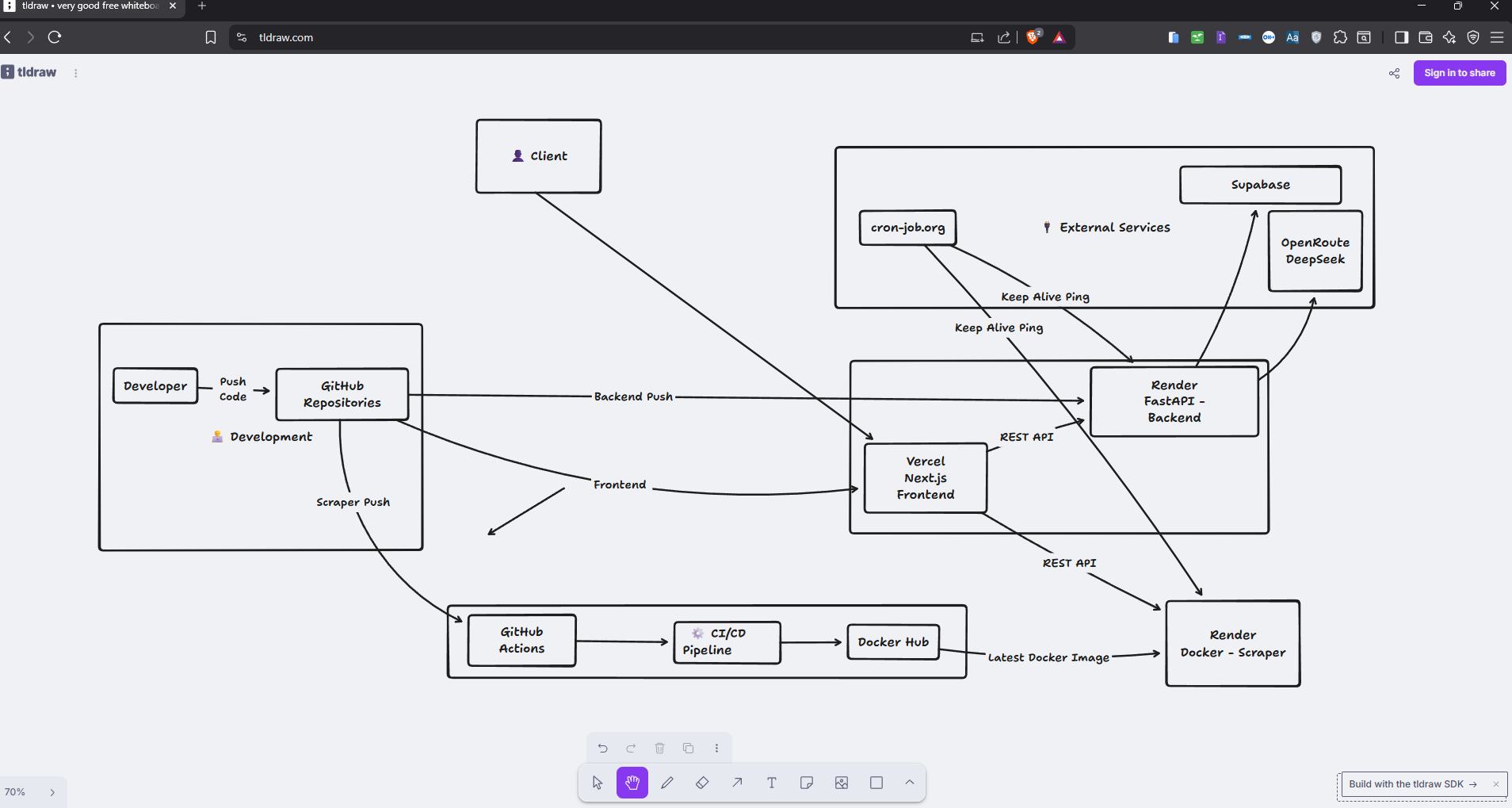
ThoughtLooking at this diagram, it's easy to think "Wow, this looks clean." But deployment is a moving target. What works perfectly for 200 users can completely melt down when actual concurrent traffic hits.
🏗️ The Core Architecture (Phase 1: Getting It Live)
When you are building a system that needs to scrape data, process it with AI, and serve a frontend, throwing everything into a single server is a recipe for disaster. Scraping is heavy and unpredictable; API endpoints need to be fast.
So, I decoupled the entire system into three distinct services based on their workloads and resource consumption.
1. The Frontend (Next.js on Vercel)
- Placed on Vercel because nothing beats its edge network for static assets and fast initial loading states.
- It acts as the orchestration layer for the user, communicating with the backend APIs via REST.
2. The Core Backend (FastAPI on Render)
- Python was non-negotiable here because the backend relies heavily on LangChain and Generative AI libraries to analyze text and draft smart outreach emails.
- Deployed directly via GitHub-to-Render integration for rapid, seamless deployment loops.
3. The Heavy Lifter (Playwright Scraper on Render via Docker)
- Browser automation with Playwright requires massive system dependencies (Chromium binaries, libraries) that standard cloud environments reject.
- The Solution: I containerized the entire scraper, built a custom CI/CD pipeline using GitHub Actions, pushed the image to Docker Hub, and configured Render to pull the latest Docker image. This completely isolated the heavy browser workloads from our main API.
⚠️ The Hidden Traps of Free/Hobby Tiers
If you deploy this architecture on hobby tiers, you will immediately run into operational bottlenecks.
- The Cold Start Problem: Render's web services spin down after 15 minutes of inactivity. If a user hits the Next.js frontend, the REST API can take up to 50 seconds to respond while the backend wakes up.
- The Solution: I had to hook up cron-job.org to send continuous Keep Alive Pings to both the FastAPI backend and the Docker Scraper. It keeps the containers hot and ready.
WarningWarning: Keep-alive pings are a temporary band-aid for low-traffic or testing phases. Relying on them for actual production workloads with paying clients is highly risky. As traffic scales, your infrastructure needs to adapt natively.
📈 Phase 2: How to Scale This to Thousands of Users
The current setup works beautifully for 200–300 users. It is cost-efficient, decoupled, and manageable. But if the user base scales to thousands or the outreach volume spikes exponentially, this hobby infrastructure will break.
Here is my engineering blueprint for shifting this system into high-gear enterprise production:
1. Background Workers & Message Queues (Redis + Celery)
Right now, the frontend hits the API, and the API waits for things to process. At scale, long-running scraping tasks or heavy AI generations will cause HTTP timeout errors.
- The Fix: Move to an asynchronous pattern. The API should instantly return a
202 Acceptedstatus, push the task to a Redis queue, and let background workers handle the scraping/AI processing in isolation.
2. Monitoring & Observability (Prometheus + Grafana)
If a scraper container crashes due to a memory leak in Playwright, we shouldn't wait for a user to complain to find out.
- The Fix: Implement standard production logging and continuous metrics collection using Prometheus to track memory usage and Grafana for central dashboards and instant alert routing.
3. Rate Limiting & Load Balancing
Heavy users could easily spam endpoints and exhaust our Supabase connections or OpenRoute/DeepSeek AI API keys.
- The Fix: Introduce an API Gateway or Nginx layer to enforce strict rate limiting per user token and distribute incoming requests evenly across multiple backend container instances.
💡 Engineering Lessons Learned
Moving an infrastructure like this from localhost to a live cloud environment changes the way you think about code.
- Isolate the Heavy Lifting: Never let browser automation (Playwright) run on the same server as your main customer-facing API. One unclosed browser tab will leak memory and crash the entire backend for every single user.
- Docker is Non-Negotiable: If your environment relies on system-level packages (like browser engines), wrap it in a Docker container immediately. It eliminates the "it works on my machine" excuse forever.
AnnouncementFinal Verdict: Building a working product is only half the battle. Figuring out how it lives, breathes, restarts, and communication loops across different cloud environments is what turns a regular script into actual software engineering.
Here are some other articles you might find interesting.

It Wasn't the Market. My Mind Was Saturated.
For 3 years, I kept switching paths and blaming the market. Turns out the problem was never outside. It was in my head.

How Realtors Can Use AI to Qualify & Close More Clients
Learn how top realtors are using AI automation to qualify leads, nurture conversations, and close more deals — without spending hours texting or calling.